

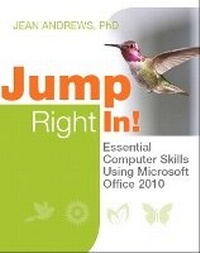
Jump Right In
Essential Computer Skills Using Microsoft Office 2010
Published on 10. February 2012
Book
Mixed media product
768 pages
978-0-13-297570-4 (ISBN)
Description
A computer literacy approach completely reinvented for the needs of today's 21st century student
Best-selling author and expert teacher Jean Andrews? reinvented the basic approach to teaching computer literacy for today's students. Andrews focuses on how computers are really used in personal life, academics, and technical careers. She teaches the #1 competency students need most: the ability to keep learning new skills on their own.
Every feature in this book is designed to make learning quick and easy. The book covers core computer skills using real-world projects that help students learn how to use these tools to perform the most common personal and business tasks:
Using and managing Windows 7 computers
Using the Internet to access and share information, and to do business
Using the Web for academic research
Capturing and organizing information with OneNote 2010
Using Word 2010 to communicate information and apply for a job
Using PowerPoint 2010 to persuade an audience, present a compelling story, or deliver important information
Using Excel 2010 to organize data, solve problems, make decisions, and transform data into knowledge
Making informed computer buying decisions
Keeping computers reliable, fast, and safe
Best-selling author and expert teacher Jean Andrews? reinvented the basic approach to teaching computer literacy for today's students. Andrews focuses on how computers are really used in personal life, academics, and technical careers. She teaches the #1 competency students need most: the ability to keep learning new skills on their own.
Every feature in this book is designed to make learning quick and easy. The book covers core computer skills using real-world projects that help students learn how to use these tools to perform the most common personal and business tasks:
Using and managing Windows 7 computers
Using the Internet to access and share information, and to do business
Using the Web for academic research
Capturing and organizing information with OneNote 2010
Using Word 2010 to communicate information and apply for a job
Using PowerPoint 2010 to persuade an audience, present a compelling story, or deliver important information
Using Excel 2010 to organize data, solve problems, make decisions, and transform data into knowledge
Making informed computer buying decisions
Keeping computers reliable, fast, and safe
More details
Language
English
Place of publication
United States
Publishing group
Pearson Education (US)
Target group
College/higher education
Dimensions
Height: 276 mm
Width: 216 mm
Weight
1397 gr
ISBN-13
978-0-13-297570-4 (9780132975704)
Copyright in bibliographic data is held by Nielsen Book Services Limited or its licensors: all rights reserved.
Schweitzer Classification
Other editions
New editions
Jean Andrews | Jill West | Joy Dark
Jump Right In
Essential Computer Skills Using Microsoft Office 2013
Book
04/2014
2nd Edition
Pearson
€126.26
Article is exhausted; no reprint
Person
Jean Andrews is a well-known, best-selling author whose books include A+ Guide to Managing and Maintaining your PC (Cengage). Andrews has 30+ years of experience in the computer industry, including more than 13 years teaching in college classrooms and three years teaching in public schools. She has worked in a wide variety of businesses and corporations designing, writing, and supporting applications software; managing a PC repair help desk; and troubleshooting networks.
Content
Part I: Getting Started
Chapter 1: Using Windows 7 to Manage Applications and Data
Chapter 2: Finding and Using Information on the Web
Chapter 3: Creating Documents with Microsoft Word
Part II: Fundamental Computer Competency
Chapter 4: Using the Web for Research
Chapter 5: Writing Papers Using Microsoft Word Templates and Tools
Chapter 6: Communicating with Others Using the Internet
Part III: Enhancing Your Productivity
Chapter 7: Finding a Job Using the Web, a Resume, and a Business Letter
Chapter 8: Persuading an Audience using a PowerPoint Presentation
Chapter 9: Adding Action and Sound to a Presentation using PowerPoint
Chapter 10: Managing Numbers and Text using Excel
Chapter 11: Organizing and Making Sense of Data using Excel
Part IV: Buying and Caring for Your Own Computer
Chapter 12: Connecting to the Internet and Securing a Computer
Chapter 13: Maintaining a Computer and Fixing Computer Problems
Chapter 14: Buying Your Own Personal Computer
Solutions Appendix (step-by-step instructions for Mastering Projects)
Chapter 1 Solutions: Using Windows 7 to Manage Applications and Data
Chapter 2 Solutions: Finding and Using Information on the Web
Chapter 3 Solutions: Creating Documents with Microsoft Word
Chapter 4 Solutions: Using the Web for Research
Chapter 5 Solutions: Writing Papers Using Microsoft Word Templates and Tools
Chapter 6 Solutions: Communicating with Others Using the Internet
Chapter 7 Solutions: Finding a Job Using the Web, a Resume, and a Business Letter
Chapter 8 Solutions: Persuading an Audience using a PowerPoint Presentation
Chapter 9 Solutions: Adding Action and Sound to a Presentation using PowerPoint
Chapter 10 Solutions: Managing Numbers and Text using Excel
Chapter 11 Solutions: Organizing and Making Sense of Data using Excel
Chapter 12 Solutions: Connecting to the Internet and Securing a Computer
Chapter 13 Solutions: Maintaining a Computer and Fixing Computer Problems
Chapter 14 Solutions: Buying Your Own Personal Computer
Chapter 1: Using Windows 7 to Manage Applications and Data
Chapter 2: Finding and Using Information on the Web
Chapter 3: Creating Documents with Microsoft Word
Part II: Fundamental Computer Competency
Chapter 4: Using the Web for Research
Chapter 5: Writing Papers Using Microsoft Word Templates and Tools
Chapter 6: Communicating with Others Using the Internet
Part III: Enhancing Your Productivity
Chapter 7: Finding a Job Using the Web, a Resume, and a Business Letter
Chapter 8: Persuading an Audience using a PowerPoint Presentation
Chapter 9: Adding Action and Sound to a Presentation using PowerPoint
Chapter 10: Managing Numbers and Text using Excel
Chapter 11: Organizing and Making Sense of Data using Excel
Part IV: Buying and Caring for Your Own Computer
Chapter 12: Connecting to the Internet and Securing a Computer
Chapter 13: Maintaining a Computer and Fixing Computer Problems
Chapter 14: Buying Your Own Personal Computer
Solutions Appendix (step-by-step instructions for Mastering Projects)
Chapter 1 Solutions: Using Windows 7 to Manage Applications and Data
Chapter 2 Solutions: Finding and Using Information on the Web
Chapter 3 Solutions: Creating Documents with Microsoft Word
Chapter 4 Solutions: Using the Web for Research
Chapter 5 Solutions: Writing Papers Using Microsoft Word Templates and Tools
Chapter 6 Solutions: Communicating with Others Using the Internet
Chapter 7 Solutions: Finding a Job Using the Web, a Resume, and a Business Letter
Chapter 8 Solutions: Persuading an Audience using a PowerPoint Presentation
Chapter 9 Solutions: Adding Action and Sound to a Presentation using PowerPoint
Chapter 10 Solutions: Managing Numbers and Text using Excel
Chapter 11 Solutions: Organizing and Making Sense of Data using Excel
Chapter 12 Solutions: Connecting to the Internet and Securing a Computer
Chapter 13 Solutions: Maintaining a Computer and Fixing Computer Problems
Chapter 14 Solutions: Buying Your Own Personal Computer