

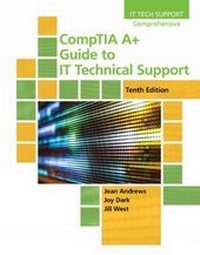
CompTIA A+ Guide to IT Technical Support
10th Edition
Published on 22. February 2019
Book
Hardback
1164 pages
978-0-357-10829-1 (ISBN)
Description
Master the details of IT technical support as Andrews/Dark/West's comprehensive COMPTIA A+ GUIDE TO IT TECHNICAL SUPPORT, 10E explains how to work with users as well as install, maintain, troubleshoot and network computer hardware and software. This step-by-step, highly visual, best-selling approach uses CompTIA A+ Exam objectives as a framework to prepare you for 220-1001 and 220-1002 certification exams. Each chapter covers core and advanced topics while emphasizing practical application of the most current technology, techniques and industry standards. You study the latest hardware, security, Active Directory, operational procedures, basics of scripting, virtualization, cloud computing, mobile devices and Windows 10. Lab Manuals, CourseNotes, online labs and optional MindTap online resources provide additional certification test preparation and interactive activities to prepare you for a role as an IT support technician or administrator.
More details
Edition
10th edition
Language
English
Place of publication
Boston, MA
United States
Publishing group
Cengage Learning, Inc
Target group
College/higher education
Dimensions
Height: 50 mm
Width: 220 mm
Thickness: 276 mm
Weight
2858 gr
ISBN-13
978-0-357-10829-1 (9780357108291)
Copyright in bibliographic data and cover images is held by Nielsen Book Services Limited or by the publishers or by their respective licensors: all rights reserved.
Schweitzer Classification
Other editions
New editions
Jean Andrews | Joy Shelton | Nicholas Pierce
CompTIA A+ Guide to Information Technology Technical Support
Book
10/2022
11th Edition
Course Technology Inc
€100.50
Shipment within 15-20 days
Previous edition

Book
01/2016
9th Edition
Course Technology Inc
€100.27
Article not available at the moment
Persons
Jean Andrews has more than 30 years of experience in the computer industry as well as more than 13 years of teaching in the college classroom. She has worked in a variety of businesses where she's designed, written, and supported application software. She has also managed a computer repair help desk and handled troubleshooting for wide area networks. Ms. Andrews has written numerous books on software, hardware and the Internet. In addition to this bestselling A+ GUIDE TO IT TECHNICAL SUPPORT, she's written the A+ GUIDE TO HARDWARE: MANAGING, MAINTAINING AND TROUBLESHOOTING. She lives in north Georgia. Joy Dark Shelton has worked in the IT field as a help-desk technician providing first-level support for a company with presence in 29 states. She has also worked as a second-tier technician in healthcare IT and as an operations specialist designing support protocols and structures, where her CompTIA A+ and HIT certifications have been particularly useful. As an instructor, Ms. Shelton has taught online IT and has taught English as a second language in the United States and South America. She has helped write several successful technical textbooks with Ms. Andrews. Ms. Shelton lives in northwest Georgia with her two daughters and pet Doberman. Jill West authors Cengage courses for CompTIA Cloud+, CompTIA Network+, Data Communications, Technology for Success and the popular Shelly Cashman Series. She has taught kindergarten through college and currently teaches computer technology courses at Georgia Northwestern Technical College. Jill specializes in designing innovative, critical-thinking activities and building courses that teach to popular IT certifications. She regularly presents at conferences and webinars on preparing for CompTIA certifications, teaching cloud computing and computer networking and mentoring lifelong student learners in IT. She's a member of the 2019 inaugural cohort of Faculty Ambassadors for AWS Educate and is currently an AWS Academy Accredited Educator. Jill and her husband, Mike, live in northwest Georgia with two children at home and two off to college.
Content
1. Taking a Computer Apart and Putting It Back Together.
2. All About Motherboards.
3. Processors and Memory.
4. Power Supplies and Troubleshooting Computer Problems.
5. Hard Drives and Other Storage Devices.
6. Supporting I/O Devices.
7. Setting up a Local Network.
8. Network Infrastructure and Troubleshooting.
9. Supporting Mobile Devices.
10. Customizing Systems, Virtualization Networks, and Managing Printers.
11. Comparing Operating Systems and User Experience.
12. Installing Operating Systems.
13. Maintaining Windows.
14. Optimizing Windows.
15. Troubleshooting Windows Startup.
16. Securing Windows Resources.
17. Security Strategies.
18. Linux and MacOS.
Appendix A: Safety Procedures and Environmental Concerns.
Appendix B: Entry Points for Startup Processes.
Appendix C: CompTIA A+ Acronyms.
2. All About Motherboards.
3. Processors and Memory.
4. Power Supplies and Troubleshooting Computer Problems.
5. Hard Drives and Other Storage Devices.
6. Supporting I/O Devices.
7. Setting up a Local Network.
8. Network Infrastructure and Troubleshooting.
9. Supporting Mobile Devices.
10. Customizing Systems, Virtualization Networks, and Managing Printers.
11. Comparing Operating Systems and User Experience.
12. Installing Operating Systems.
13. Maintaining Windows.
14. Optimizing Windows.
15. Troubleshooting Windows Startup.
16. Securing Windows Resources.
17. Security Strategies.
18. Linux and MacOS.
Appendix A: Safety Procedures and Environmental Concerns.
Appendix B: Entry Points for Startup Processes.
Appendix C: CompTIA A+ Acronyms.