

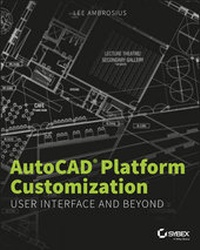
AutoCAD Platform Customization
User Interface and Beyond
1st Edition
Published on 11. January 2016
Book
Paperback/Softback
288 pages
978-1-118-79888-1 (ISBN)
Description
Make AutoCAD your own with powerful personalization options Options for AutoCAD customization are typically the domain of administrators, but savvy users can perform their own customizations to personalize AutoCAD. Until recently, most users never thought to customize the AutoCAD platform to meet their specific needs, instead leaving it to administrators. If you are an AutoCAD user who wants to ramp up personalization options in your favorite software, AutoCAD Platform Customization: User Interface and Beyond is the perfect resource for you. Author Lee Ambrosius is recognized as a leader in AutoCAD platform customization and can help you get the most out of AutoCAD.
Establish and manage CAD standards for the drawings you create
Control the startup process and settings that define the drawing environment
Modify the user interface to display the commands you use most frequently and create new commands
Create macros to speed up frequently repeated tasks
Define custom shapes, linetypes, and hatch patters to control the linework in a drawing
Use real-world tips and tutorials to reinforce the author's topical discussions
A perfect resource for CAD administrators, students, senior drafters, and other CAD enthusiasts, AutoCAD Platform Customization: User Interface and Beyond features in-depth discussions of customization options as well as detailed examples and tutorials. As an eight-year customization and programming session leader with Autodesk University, Lee Ambrosius is uniquely qualified to help users get the most out of software based on the AutoCAD platform. His AutoCAD Platform Customization: User Interface and Beyond is the go-to resource for those who are ready to take their software customization to the next level.
Establish and manage CAD standards for the drawings you create
Control the startup process and settings that define the drawing environment
Modify the user interface to display the commands you use most frequently and create new commands
Create macros to speed up frequently repeated tasks
Define custom shapes, linetypes, and hatch patters to control the linework in a drawing
Use real-world tips and tutorials to reinforce the author's topical discussions
A perfect resource for CAD administrators, students, senior drafters, and other CAD enthusiasts, AutoCAD Platform Customization: User Interface and Beyond features in-depth discussions of customization options as well as detailed examples and tutorials. As an eight-year customization and programming session leader with Autodesk University, Lee Ambrosius is uniquely qualified to help users get the most out of software based on the AutoCAD platform. His AutoCAD Platform Customization: User Interface and Beyond is the go-to resource for those who are ready to take their software customization to the next level.
More details
Language
English
Place of publication
New York
United States
Publishing group
John Wiley & Sons Inc
Dimensions
Height: 235 mm
Width: 185 mm
Thickness: 15 mm
Weight
508 gr
ISBN-13
978-1-118-79888-1 (9781118798881)
Copyright in bibliographic data and cover images is held by Nielsen Book Services Limited or by the publishers or by their respective licensors: all rights reserved.
Schweitzer Classification
Other editions
Additional editions
E-Book
01/2014
Sybex Inc.,U.S.
€16.99
Available for download
E-Book
01/2014
Sybex Inc.,U.S.
€16.99
Available for download
Person
Lee Ambrosius is a Principal Learning Content Developer at Autodesk for the AutoCAD and AutoCAD LT products and has worked on end-user and API documentation for eight releases. He has presented customization and programming sessions at Autodesk University for a decade, and has authored and edited several AutoCAD-related books. Follow him on twitter at @leeambrosius.
Content
Introduction xiii
Chapter 1 Establishing the Foundation for Drawing Standards 1
Chapter 2 Working with Nongraphical Objects 33
Chapter 3 Building the Real World One Block at a Time 67
Chapter 4 Manipulating the Drawing Environment 97
Chapter 5 Customizing the AutoCAD User Interface for Windows 119
Chapter 6 Customizing the AutoCAD User Interface for Mac 165
Chapter 7 Creating Tools and Tool Palettes 181
Chapter 8 Automating Repetitive Tasks 199
Chapter 9 Defining Shapes, Linetypes, and Hatch Patterns 219
Chapter 10 Using, Loading, and Managing Custom Files 247
Index 259
Chapter 1 Establishing the Foundation for Drawing Standards 1
Chapter 2 Working with Nongraphical Objects 33
Chapter 3 Building the Real World One Block at a Time 67
Chapter 4 Manipulating the Drawing Environment 97
Chapter 5 Customizing the AutoCAD User Interface for Windows 119
Chapter 6 Customizing the AutoCAD User Interface for Mac 165
Chapter 7 Creating Tools and Tool Palettes 181
Chapter 8 Automating Repetitive Tasks 199
Chapter 9 Defining Shapes, Linetypes, and Hatch Patterns 219
Chapter 10 Using, Loading, and Managing Custom Files 247
Index 259