

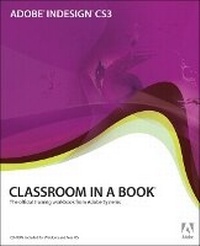
Adobe InDesign CS3 Classroom in a Book
Published on 30. April 2007
Book
Mixed media product
464 pages
978-0-321-49201-2 (ISBN)
Description
This thorough, self-paced guide to Adobe InDesign CS3 is ideal for beginning users who want to master the key features of this program, while readers who already have some experience with InDesign can use this book to familiarize themselves with InDesign CS3's newest features. Using step-by-step, project-based lessons, each chapter contains a project that builds upon the reader's growing knowledge of the program, while review questions at the end of each chapter reinforce the most important skills learned in each lesson. The companion CD contains all the assets readers will need to work through each project in the book. Adobe InDesign CS3, Adobe's page layout and design software, has been updated to accelerate user productivity with loads of new features: new Photoshop effects--including gradient feathering, inner shadows, and glows--that you can apply to objects on a page; finer transparency controls, which let you apply transparency settings independently to an object's fill, stroke, and content for more complex visual looks; numerous productivity enhancements; advanced find/change features; new table and cell styles; export to XHTML, and more.
Educational instructor notes-created to help teachers plan, organize, and time their lessons-are available for this book (and for other Classroom in a Book titles) at www.peachpit.com/instructorresources.
SPECIAL NOTE: Before starting the lessons in the book, visit www.peachpit.com/indesigncs3cib for important lesson and project file updates.
Educational instructor notes-created to help teachers plan, organize, and time their lessons-are available for this book (and for other Classroom in a Book titles) at www.peachpit.com/instructorresources.
SPECIAL NOTE: Before starting the lessons in the book, visit www.peachpit.com/indesigncs3cib for important lesson and project file updates.
More details
Language
English
Place of publication
Indianapolis
United States
Publishing group
Pearson Education (US)
Target group
College/higher education
Dimensions
Height: 189 mm
Width: 230 mm
Thickness: 22 mm
Weight
924 gr
ISBN-13
978-0-321-49201-2 (9780321492012)
Copyright in bibliographic data and cover images is held by Nielsen Book Services Limited or by the publishers or by their respective licensors: all rights reserved.
Schweitzer Classification
Other editions
New editions
.. Adobe Creative Team
Adobe InDesign CS4 Classroom in a Book
Book
11/2008
Adobe Press,U.S.
€43.68
Article exhausted; check for reprint
Previous edition
.. Adobe Creative Team
Adobe InDesign CS2 Classroom in a Book
Book
07/2005
Adobe Press,U.S.
€43.68
Article exhausted; check for reprint
Person
The Adobe Creative Team of designers, writers, and editors has extensive, real world knowledge of Adobe products. They work closely with the Adobe product development teams and Adobe's Instructional Communications team to come up with creative, challenging, and visually appealing projects to help both new and experienced users get up to speed quickly on Adobe software products
Content
Getting Started
What's New in Adobe InDesign CS3
A Quick Tour of Adobe InDesign CS3
1. Getting to Know the Work Area
2. Setting Up Your Document
3. Working with Frames
4. Importing and Editing Text
5. Working with Typography
6. Working with Color
7. Working with Styles
8. Importing and Linking Graphics
9. Creating Tables
10. Working with Transparency
11. Working with Long Documents
12. Output and PDF Exporting
13. Using XML
What's New in Adobe InDesign CS3
A Quick Tour of Adobe InDesign CS3
1. Getting to Know the Work Area
2. Setting Up Your Document
3. Working with Frames
4. Importing and Editing Text
5. Working with Typography
6. Working with Color
7. Working with Styles
8. Importing and Linking Graphics
9. Creating Tables
10. Working with Transparency
11. Working with Long Documents
12. Output and PDF Exporting
13. Using XML