

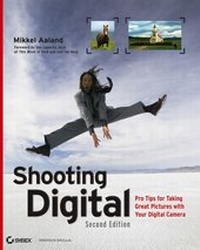
Shooting Digital
Pro Tips for Taking Great Pictures with Your Digital Camera
2nd Edition
Published on 7. November 2006
Book
Paperback/Softback
288 pages
978-0-470-04287-8 (ISBN)
Description
"Be part of the revolution."
--Leo Laporte, This Week in Tech
Go beyond the basics to mastery of the art and craft of digital photography in this new edition of the landmark book from award-winning photographer and author Mikkel Aaland. Aaland draws upon his thirty years of experience in the field, plus the wisdom of more than two dozen contributing professional photographers, to provide authoritative coverage of the latest technologies and best photographic practices. You'll find a wealth of pro tips, shooting techniques, technical recommendations, and step-by-step examples accompanied by stunning photographs that illustrate the practical aspects as well as the aesthetics of digital photography. Build your skills and get inspired with this striking and practical book.
* Capture high-impact images of people, landscapes, products, and more
* Shoot RAW and get the most quality and flexibility out of your digital camera
* Create stunning black-and-white photographs
* Learn to compensate for the main drawbacks of digital cameras
* Photograph underwater, from the sky, beyond visible light, and at night
* Use JPEG 2000, panorama stitching, and other new editing tools
* Focus in depth on technical topics such as histograms and sensors
Stop the action, blur the scene, convert to B&W all in camera or on your computer.
Shoot better so your images will need less editing.
Tag, sort, store, and find your photos more efficiently.
Reviews / Votes
Major companies like Kodak and Nikon are abandoning the manufacture of film cameras and are producing affordable digitals, so it's an ideal time for substantial manuals on their use to appear. Aaland was among the first to write such books when his Digital Photography was published in 1992. In this second edition of Shooting Digital, he has removed material that is no longer relevant (e.g., shutter-release lag) and added chapters on shooting and processing RAW data and on the digital renaissance in shooting in black and white. Highly recommended. (Library Journal, March 15, 2007)"Renowned author Aaland takes photographers through an enjoyable but fluidly intellectual guide for self-improvement." (Digital Photographer) "Renowned author Aaland takes photographers through an enjoyable but fluidly intellectual guide for self-improvement." ( Digital Photographer)More details
Edition
2., Auflage
Language
English
Place of publication
Chichester
United Kingdom
Publishing group
John Wiley and Sons Ltd
Edition type
Revised edition
Illustrations
col. Illustrations
Dimensions
Height: 25.4 cm
Width: 20.1 cm
Thickness: 15 mm
Weight
834 gr
ISBN-13
978-0-470-04287-8 (9780470042878)
Schweitzer Classification
Other editions
Additional editions
E-Book
11/2006
2nd Edition
Sybex
€36.40
Available for download
Previous edition
Book
08/2003
1st Edition
Sybex Inc.,U.S.
€39.90
Article exhausted; check for reprint
Person
Mikkel Aaland is an award-winning photographer and author of ten books, including Photoshop Elements 4 Solutions from Sybex. His photography has been published in Wired, Newsweek, and several European periodicals, and he is a regular guest on the television show Call for Help, hosted by Leo Laporte. His work has been exhibited in major institutions around the world, including the Bibliothèque Nationale in Paris and the former Lenin Museum in Prague.
Content
Chapter 1: Before You Shoot.
Bridging the Film/Digital Gap.
The Right Digital Camera.
Knowing Your Digital Camera.
Software Solutions.
Accessories That Make a Difference.
Finding Up-to-Date Information and Support.
Chapter 2: Shooting RAW.
When to Shoot RAW.
Critical--and Less Critical--Digital Camera Settings.
Getting the Correct Exposure for RAW.
RAW Data Revealed.
Optimizing a Raw Image with Software.
Preparing RAW to Share.
Chapter 3: Shooting Great Portraits.
The Digital Photographer and the Subject.
Preparing for Your Shoot.
Working with Your Subject During the Shoot.
Making Head and Shoulders Shots.
Environmental Portraits.
Group Portraits.
Chapter 4: Photographing Children, Pets, and Social Events.
Beating the Odds.
Overcoming Camera Lag.
Photographing Children.
Photographing Pets.
Photographing Social Events.
Chapter 5: Shooting Action.
The Zen of Shooting Action.
Optimal Digital Camera Settings for Speed.
An Ideal Digital Camera for Action Shots.
Panning for Action.
Composition and Motion.
Capturing the Decisive Moment.
Focus on Reaction.
Chapter 6: Shooting Digital on the Road.
Packing Digital for the Road.
Storage and Archiving on the Road.
Shooting Digital Candids.
A Digital Road Trip.
Shooting in the Cold.
Shooting in Heat and Humidity.
Using the Movie Mode.
Chapter 7: Shooting Interiors and Exteriors.
A Different Approach.
Choosing Light and Location.
Maximizing Image Quality.
Playing with Scale.
Adding Motion.
Considering Keystoning.
Composing the Shot.
Interior and Exterior Light.
Mixing Interior and Exterior Light.
Attention to Detail.
Chapter 8: Shooting Beautiful Landscapes.
What Makes a Good Landscape?
Maximizing Image Quality.
Composition and Content.
Chapter 9: Shooting Black and White.
Black-and-White Shooting Considerations.
When to Convert: Camera or Computer?
Using Photoshop's Channel Mixer.
Advanced Localized Black-and-White Control with RAW.
Chapter 10: Shooting Your Stuff.
Using Indirect Natural Light.
Shooting Loose with Software in Mind.
A Basic Digital Photography Studio.
A Digital Studio in a Box.
Studio Lighting Techniques.
The Art of Composition.
Pushing the Envelope.
Shooting Flat Objects with Lights.
Chapter 11: Shooting Past the Boundaries.
Shooting Beyond Visible Light.
Shooting Digital Underwater.
Shooting Digital from the Sky.
Night Shots.
Digital Grid Photos.
Shooting Digital Minimovies.
Shooting Simple Panoramas.
Chapter 12: Organizing and Sharing Digital Photos.
Direct to Print.
Digital Camera to Computer.
Organizing and Managing Digital Photos.
Sharing Digital Photos.
Appendix: An In-Depth Look at Digital Technologies and Procedures.
Reading the Histogram.
Fine-Tuning White Balance.
Sensors Expanded.
Extending Exposure Latitude with Software.
Index.
Contributors.