

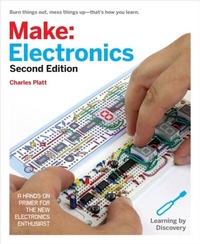
Make: Electronics
Learning Through Discovery
1. Auflage
Erschienen am 10. August 2015
352 Seiten
978-1-68045-024-8 (ISBN)
Beschreibung

"e;This is teaching at its best!"e;--Hans Camenzind, inventor of the 555 timer (the world's most successful integrated circuit), and author of Much Ado About Almost Nothing: Man's Encounter with the Electron (Booklocker.com)"e;A fabulous book: well written, well paced, fun, and informative. I also love the sense of humor. It's very good at disarming the fear. And it's gorgeous. I'll be recommending this book highly."e;--Tom Igoe, author of Physical Computing and Making Things TalkA "e;magnificent and rewarding book. ... Every step of this structured instruction is expertly illustrated with photos and crisp diagrams. . . . This really is the best way to learn."e;--Kevin Kelly, in Cool ToolsThe first edition of Make: Electronics established a new benchmark for introductory texts. This second edition enhances that learning experience.Here you will find unique, photographically precise diagrams of breadboarded components, to help you build circuits with speed and precision. A new shopping guide and a simplified range of components, will minimize your investment in parts for the projects. A completely new section on the Arduino shows you how to write properly structured programs instead of just downloading other people's code. Projects have been reworked to provide additional features, and the book has been restructured to offer a step-by-step learning process that is as clear and visually pleasing on handheld devices as it is on paper. Full color is used throughout.As before, Make: Electronics begins with the basics. You'll see for yourself how components work--and what happens when they don't. You'll short out a battery and overheat an LED. You'll also open up a potentiometer and a relay to see what's inside. No other book gives you such an opportunity to learn from real-life experiences.Ultimately, you will build gadgets that have lasting value, and you'll have a complete understanding of how they work. From capacitors to transistors to microcontrollers--it's all here.Hans Camenzind, inventor of the 555 Timer (the world's most successful integrated circuit chip), said that "e;This is teaching at its best!"e; when he reviewed the first edition. Now the second edition offers even more!
Weitere Details
Weitere Ausgaben
Nachauflagen
Charles Platt
Make: Electronics
E-Book
09/2021
1. Auflage
Make Community LLC
27,99 €
Als Download verfügbar
Andere Ausgaben
Charles Platt
Make: Electronics, 2e
Buch
10/2015
Make Community, LLC
54,64 €
Artikel ist vergriffen; siehe Neuauflage
Inhalt
- Intro
- Copyright
- Table of Contents
- What's New in the Second Edition
- Preface: How to Have Fun with This Book
- How to Contact Us
- Chapter 1. The Basics
- Necessary Items for Chapter One
- The Multimeter
- Ranging
- Values
- Safety Glasses
- Batteries and Connectors
- Test Leads
- Potentiometer
- Fuse
- Light-Emitting Diodes
- Resistors
- Experiment 1: Taste the Power!
- What You Will Need
- Caution: No More than Nine Volts
- Procedure
- Setting Up Your Meter
- Fundamentals: Ohms
- Measuring Your Tongue
- Fundamentals: Inside a Battery
- Further Investigation
- Background: The Man Who Discovered Resistance
- Cleanup and Recycling
- Experiment 2: Let's Abuse a Battery!
- Caution: Use a Small Battery
- What You Will Need
- Generating Heat with Current
- Background: Why Didn't Your Tongue Get Hot?
- Fundamentals: Volt Basics
- Fundamentals: Ampere Basics
- How to Blow a Fuse
- Fundamentals: Direct and Alternating Current
- Background: Inventor of the Battery
- Background: Father of Electromagnetism
- Cleanup and Recycling
- Experiment 3: Your First Circuit
- What You Will Need
- Setup
- Fundamentals: Decoding Resistors
- Lighting an LED
- Checking a Resistor
- Background: Puzzling Numbers
- Cleanup and Recycling
- Experiment 4: Variable Resistance
- What You Will Need
- Look Inside Your Potentiometer
- Testing the Potentiometer
- Caution: Don't Add Power
- Caution: Destructive Experiment Ahead
- Dimming Your LED
- Measuring Potential Difference
- Checking the Flow
- Caution: Meter Overload
- Checking the Current
- Making Measurements
- Fundamentals: Ohm's Law
- Fundamentals: Series and Parallel
- Using Ohm's Law
- How Big a Resistor?
- Background: Hot Wires
- Fundamentals: Decimals
- Theory: The Math on Your Tongue
- Background: The Watt
- Background: The Origins of Wattage
- Cleanup and Recycling
- Experiment 5: Let's Make a Battery
- What You Will Need
- Setup
- Lemon Test: Part One
- Theory: The Nature of Electricity
- Background: Positive and Negative
- Theory: Basic Measurements
- Practically Speaking
- Cleanup and Recycling
- Chapter 2. Switching
- Necessary Items for Chapter Two
- Essential: Small Screwdrivers
- Essential: Small Long-Nosed Pliers
- Optional: Sharp-Nosed Pliers
- Essential: Wire Cutters
- Optional: Flush Cutters
- Essential: Wire Strippers
- Essential: Breadboards
- Supplies
- Essential: Hookup Wire
- Jumpers
- Optional: Stranded Wire
- Components
- Essential: Toggle Switch
- Essential: Tactile Switch
- Essential: Relay
- Essential: Trimmer Potentiometer
- Essential: Transistors
- Essential: Capacitors
- Essential: Resistors
- Essential: Loudspeaker
- And More?
- Experiment 6: Very Simple Switching
- What You Will Need
- Fundamentals: All About Switches
- Sparking
- Checking Continuity
- Background: Early Switching Systems
- Introducing Schematics
- Fundamentals: Basic Schematic Symbols
- Schematic Layout
- Crossovers
- Colored Conductors
- Experiment 7: Investigating a Relay
- What You Will Need:
- The Relay
- Caution: Polarity Problems
- Procedure
- What's Going On Inside
- Other Relays
- Opening It Up
- What's Inside?
- Fundamentals: Relay Terminology
- Experiment 8: A Relay Oscillator
- What You Will Need
- A Beginner's Board
- Making Jumpers
- Power Up
- Inside the Board
- Dual-Bus Boards
- Relay Circuit, Revealed
- Making It Buzz
- Adding Capacitance
- Fundamentals: Farad Basics
- Caution: Getting Zapped by Capacitors
- Fundamentals: Capacitor Basics
- Caution: Observe Capacitor Polarity!
- Fundamentals: Fault Tracing
- Background: Michael Faraday and Capacitors
- Experiment 9: Time and Capacitors
- What You Will Need
- Charging a Capacitor
- An RC Network
- Voltage, Resistance, and Capacitance
- Background: The Time Constant
- Background: Graphing It
- Experimental Verification
- Capacitive Coupling
- Displacement Current
- Alternating Current
- Experiment 10: Transistor Switching
- What You Will Need
- The Finger Test
- Caution: Never Use Two Hands
- Inside the Finger Test
- Fundamentals: Transistor Variants
- Adding a Potentiometer
- Voltage and Current
- Fundamentals: All About NPN and PNP Transistors
- Caution: Fragile Component!
- Background: Transistor Origins
- Fundamentals: Transistors and Relays
- Experiment 11: Light and Sound
- What You Will Need
- Fluctuations
- Step by Step
- Coupling Capacitor
- But How Does It Start?
- Why So Complicated?
- A Processed Pulse
- Upping the Speed
- Still More Mods
- Background: Mounting a Loudspeaker
- Chapter 3. Getting Somewhat More Serious
- Necessary Items for Chapter Three
- Essential: Power Supply
- Essential: Low-Power Soldering Iron
- Essential: General Duty Soldering Iron
- Soldering Iron Terminology
- Essential: Helping Hand
- Essential: Magnifying Lens
- Optional: Clip-on Meter Test Leads
- Optional: Heat Gun
- Optional: Desoldering Equipment
- Optional: Soldering Stand
- Optional: Miniature Hand Saw
- Optional: Deburring Tool
- Optional: Calipers
- Supplies
- Essential: Solder
- Optional: Heat-Shrink Tubing
- Essential: Copper Alligator Clips
- Optional: Perforated Board
- Optional: Plywood
- Optional: Machine Screws
- Essential: Project Boxes
- Essential: Power Connectors
- Optional: Headers
- Components
- Diodes
- Experiment 12: Joining Two Wires Together
- What You Will Need
- Caution: Soldering Irons Do Get Hot!
- Your First Solder Joint
- Background: Soldering Myths
- Fundamentals: Eight Soldering Errors
- Background: Soldering Alternatives
- Your Second Solder Joint
- Theory: Heat Transfer
- Insulating the Solder Joint
- Caution: Heat Guns Do Get Hot!
- Wiring Your Power Source
- Step One: Cut and Measure
- Step Two: Soldering
- Pruning a Power Cord
- Twelve Steps to a Shorter Cord
- What's Next?
- Experiment 13: Roasting an LED
- What You Will Need
- Where the Heat Goes
- Rules for Heat Sinking
- Experiment 14: A Wearable Pulsing Glow
- What You Will Need
- Fluctuations Revisited
- Bend Wires, Add Solder
- Step by Step
- Caution: Flying Wire Segments
- Finishing the Job
- Background: Maddened by Measurement
- Experiment 15: Intrusion Alarm, Part One
- What You Will Need
- Wish List
- Implementing the Wish List
- Magnetic Sensor Switches
- A Break-to-Make Transistor Circuit
- Self-Locking Relay
- Blocking Bad Voltage
- Fundamentals: All About Diodes
- One Problem Creates Another
- Solving the Problem
- Protection Diode
- Time to Breadboard
- Adding the Sound
- Reference: Take-Home Messages
- Chapter 4. Chips, Ahoy!
- Necessary Items for Chapter Four
- Components
- Fundamentals: Choosing Chips
- Optional: IC Sockets
- Essential: Subminiature Slide Switch
- Caution: Switching Overload
- Essential: Low-Current LEDs
- Essential: Numeric Displays
- Essential: Voltage Regulator
- Optional Extras
- Background: How Chips Came to Be
- Experiment 16: Emitting a Pulse
- What You Will Need
- Know Your Chips
- Monostable Test
- Timing the Pulse
- Caution: Beware of Pin-Shuffling!
- Fundamentals: Timer Duration
- Theory: Inside the 555 in Monostable Mode
- Fundamentals: Pulse Suppression
- Fundamentals: Why the 555 Is Useful
- Fundamentals: Bistable Mode
- Background: How the Timer Was Born
- Fundamentals: 555 Timer Specifications
- Caution: Not All Timers Are Equal
- Experiment 17: Set Your Tone
- What You Will Need
- Astable Test
- Theory: Output Frequency
- Theory: Inside the 555 in Astable Mode
- Fundamentals: Unequal On-Off Cycles
- Astable Modifications
- Chaining Chips
- Sounding Like a Siren
- Experiment 18: Intrusion Alarm (Almost) Completed
- What You Will Need
- Three Steps to a Functional Device
- Step 1
- Step 2
- Step 3
- What About the Noise?
- What About On and Off?
- Finalizing
- Most Common Perfboarding Errors
- Fundamentals: Perforated Board Fault Tracing
- The Project Box
- Soldering the Switches
- Fixing the Board
- Caution: Avoid Board Stress
- Final Test
- Alarm Installation
- Conclusion
- Experiment 19: Reflex Tester
- What You Will Need
- Caution: Protecting Chips from Static
- Caution: Be Careful When Grounded
- A Quick Demo
- Fundamentals: LED Displays
- Fundamentals: The Counter
- Pulse Generation
- Time for a Plan
- A Control System
- Progress Report
- The Delay
- Testing
- How Does It Work?
- Background: Development Issues
- Extra Digits
- Calibration
- Enhancements
- Next?
- Experiment 20: Learning Logic
- What You Will Need
- The Regulator
- Caution: Inappropriate Inputs
- Usage
- Your First Logic Gate
- Background: Logical Origins
- Fundamentals: Logic Gate Basics
- Background: The Confusing World of TTL and CMOS
- What You Don't Need
- Fundamentals: Part Numbers and Functions
- Fundamentals: Rules for Connecting Logic Gates
- Experiment 21: A Powerful Combination
- Caution: The Warranty Issue
- What You Will Need
- A Three-Part Circuit
- How It Works
- More than One Button?
- Triggering the Relay
- The Logic Chip
- Time to Build!
- Setup
- Testing
- Dealing with Diodes
- Questions
- The Computer Interface
- Enhancements
- Experiment 22: Race to Place
- What You Will Need
- The Goal
- A Conceptual Experiment
- Breadboarding It
- Enhancements
- Experiment 23: Flipping and Bouncing
- What You Will Need
- How It Works
- Debouncing with NORs
- Debouncing with NANDs
- Jamming Versus Clocking
- Experiment 24: Nice Dice
- What You Will Need
- A Binary Counter
- Counter Testing
- Fundamentals: Binary Code
- Rising Edge, Falling Edge
- The Modulus
- Converting to Modulus 6
- Not Using a Seven-Segment Display
- Choosing the Gates
- The Finished Circuit
- Good News
- Chained Counters
- Going Further
- The Slowdown Problem
- Slowdown Alternatives
- Chapter 5. What Next?
- Tools, Equipment, Components, and Supplies
- Customizing Your Work Area
- Labeling
- On the Bench
- Reference Sources Online
- Books
- Experiment 25: Magnetism
- Fundamentals: A Two-Way Relationship
- What You Will Need
- Procedure
- Theory: Inductance
- Fundamentals: Coil Schematics and Basics
- Background: Joseph Henry
- Experiment 26: Tabletop Power Generation
- What You Will Need
- Procedure
- Lighting an LED
- Optional Extensions
- Caution: Blood Blisters and Dead Media
- Charging a Capacitor
- Next: Audio
- Experiment 27: Loudspeaker Destruction
- What You Will Need
- Procedure
- Background: Origins of Loudspeakers
- Theory: Sound, Electricity, and Sound
- Experiment 28: Making a Coil React
- What You Will Need
- Procedure
- A Collapsing Field
- Resistors, Capacitors, and Coils
- Theory: Alternating Current Concepts
- Experiment 29: Filtering Frequencies
- What You Will Need
- A Home for Your Speaker
- A Single Chip
- Test, 1-2-3
- Adventures in Audio
- Theory: Waveforms
- Mangling Some Music
- Background: Crossover Networks
- Experiment 30: Make It Fuzzy
- What You Will Need
- Making the Mods
- Background: Clipping
- Background: Stomp-Box Origins
- Experiment 31: One Radio, No Solder, No Power
- What You Will Need
- Step 1: The Coil
- Caution: High Voltage!
- Antenna and Ground
- Enhancements
- Theory: How Radio Works
- Experiment 32: Hardware Meets Software
- What You Will Need
- Definitions
- Real-World Applications
- The Right Tool for the Job?
- One Board, Many Chips
- Beware of Imitations?
- Setup
- Linux Installation
- Windows Installation
- Windows Troubleshooting
- Mac Installation
- If All Else Fails
- The Old Arduino Blink Test
- Verify and Compile
- Upload and Run
- Caution: Lost Code
- Programming Entails Detail
- Background: Origins and Options Among Programmable Chips
- Fundamentals: Advantages and Disadvantages
- Longevity
- Obsolescence
- Hybrid Circuits
- Individual Components: Advantages
- Individual Components: Disadvantages
- Microcontrollers: Advantages
- Microcontrollers: Disadvantages
- Summing Up
- Experiment 33: Checking the Real World
- What You Will Need
- Using a Thermistor
- Range Conversion
- Connections
- What, No Output?
- Hysteresis
- Line by Line
- Additional Details
- Enhancements
- Experiment 34: Nicer Dice
- What You Will Need:
- The Limits to Learning by Discovery
- Randomicity
- Pseudocode
- Button Inputs
- The System Clock
- Final Draft of Pseudocode
- Hardware Setup
- Now, the Program
- Short and Long Integers
- Setup
- The "for" Loop
- The Random Function
- The "if" Statement
- Flash Speed
- Creating a New Function
- Structure
- But Is It Too Difficult?
- Upgrading the Nicer Dice Program
- Other Microcontrollers
- Unexplored Territory
- In Closing
- Chapter 6. Tools, Equipment, Components, and Supplies
- Kits
- Searching and Shopping Online
- The Art of Searching
- Try the Chat Option
- Parts on Google
- Datasheets
- General Search Techniques
- Exclusions
- Alternatives
- Too Much Typing?
- Vendor Categories
- Which to Click First?
- A Real-Life Search
- eBay Options
- Amazon
- Killing Autocomplete
- Is Searching Worth the Trouble?
- Checklists of Supplies and Components
- Supplies
- Components
- Other Components
- Components for Chapter One
- Components for Chapter Two
- Components for Chapter Three
- Components for Chapter Four
- Components for Chapter Five
- Buying Tools and Equipment
- Tools and Equipment for Chapter One
- Tools and Equipment for Chapter Two
- Tools and Equipment for Chapter Three
- Suppliers
- Index
- About the Author
